
Breached password checks for Signature 365 accounts
What is changing
Signature 365 checks teammate account passwords against a large database of passwords exposed in previous data breaches during sign-in.
If your password is found, Signature 365 will display an alert. You should change the password before using it again.
Why we are making this change
Passwords exposed in a data breach can be added to lists used by attackers. If the same password is reused on multiple accounts an attacker can use this in an automated attack commonly called credential stuffing.
Checking for previously exposed passwords identifies passwords that should no longer be considered safe, even when they otherwise meet password length or complexity requirements. Updating to use a different password reduces the risk of an exposed password being used to access your Signature 365 account.
What you will see
If the password you use to sign in is found in the breached password corpus, you will see the following warning explaining that the password has been exposed previously. You should replace it with a strong, unique password.
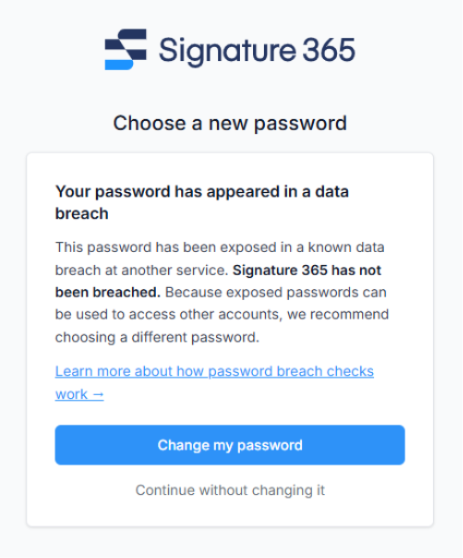
The warning relates to the password itself. It does not indicate that:
- Signature 365 has suffered a data breach.
- The password was obtained from Signature 365.
- Your Signature 365 account has been accessed by another person.
- The source of the password exposure is known.
How to resolve the alert
- Follow the on-screen instructions to change your Signature 365 password.
- Choose a strong, unique password that you have not used for Signature 365 or any other account.
- Do not use small variations of the exposed password, such as adding a number or changing one character.
- If you have used the exposed password for any other services, update those logins too.
- Store your new password in a reputable password manager so that it can be long and unique without needing to be memorised.
After changing the password, sign in again using the new password.
Enable two-factor authentication for your Signature 365 account for an additional layer of protection. It does not make an exposed password safe to continue using.
Apple Mail application replaces images with when replying
Why Apple Mail converts embedded signature images to attachments when replying or forwarding, and what that means for Signature 365 emails.
Changing signatures in plain text emails is not supported
Learn why Signature 365 cannot change plain-text email signatures and how to switch to HTML format instead.